
Best APN for Globe 2026
Fast Internet Settings for Android & iPhone – Optimize Your Connection Speed
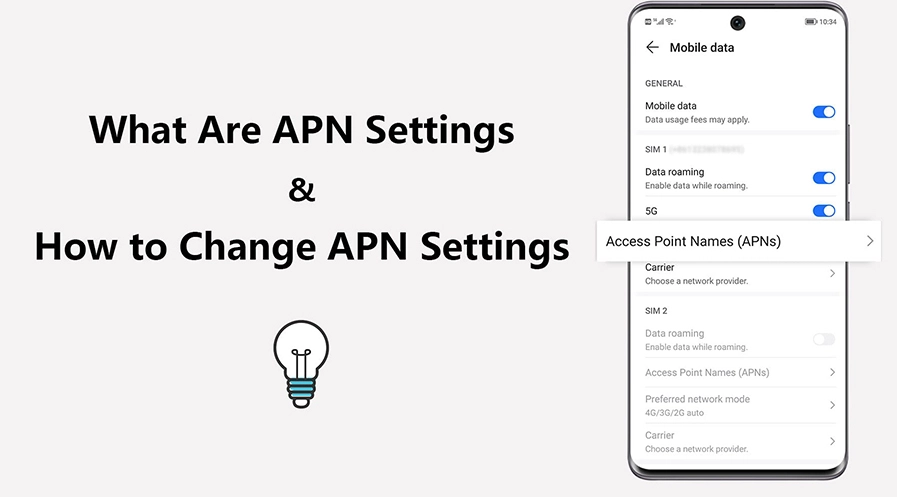
Default Globe APN Settings
Standard Configuration
OfficialThese settings are officially supported by Globe Telecom and provide reliable connectivity for most users throughout the Philippines.
Optimized for Gaming & Streaming
Fast Internet Configuration
RecommendedUse these optimized settings to reduce latency in online games, improve streaming quality, and achieve faster download speeds.
Configuration Guide
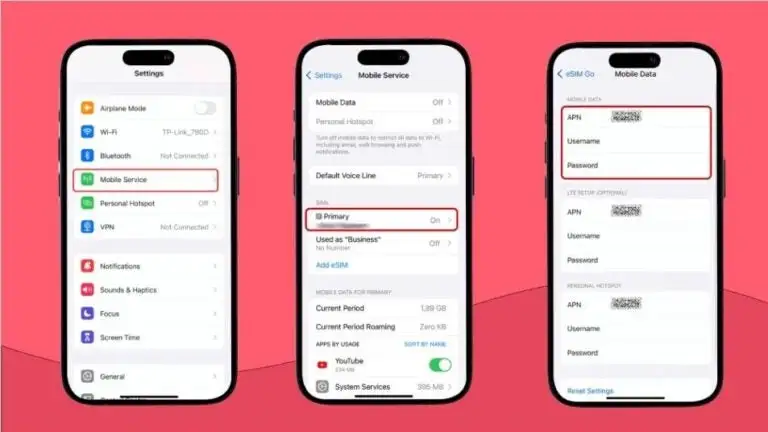
Open Settings
Navigate to your device’s Settings menu from the app drawer or notification panel.
Mobile Network
Select “Mobile Network,” “Connections,” or “Network & Internet” depending on your device.
Access Point Names
Tap on “Access Point Names” or “APN” to view current configurations.
Add New APN
Tap the “+” icon or menu button to add a new access point.
Enter Details
Carefully input all the APN settings from the configuration tables above.
Save & Activate
Save the configuration and select it as your default APN.
Restart Device
Reboot your phone to ensure all settings take effect properly.
Reset APN Settings
If you encounter connectivity issues after making changes, resetting to default settings can help resolve problems:
Android Devices:
Settings → Mobile Network → Access Point Names → Menu (three dots) → Reset to default
iPhone Devices:
Settings → General → Transfer or Reset iPhone → Reset → Reset Network Settings
Tips to Boost Internet Speed
Use LTE Mode
Switch from 3G to 4G/LTE in your network settings for significantly faster speeds.
Regular Restarts
Restart your device weekly to refresh network connections and clear cache.
Clear Cache
Regularly clear cache of data-heavy apps like social media and streaming platforms.
Signal Strength
Use your device in areas with strong Globe network coverage for optimal performance.
Airplane Mode
Toggle Airplane mode for 3-5 seconds to force a fresh network connection.
Background Data
Restrict background data for apps that don’t require constant updates.
Troubleshooting Common Issues
Experience Faster Globe Internet Today
Applying the correct APN settings can transform your browsing, streaming, and gaming experience. Test both configurations to determine which delivers optimal performance for your location and usage patterns.
