
How to Convert Globe Physical SIM to eSIM (Complete Guide 2026)
In 2026, digital technology was at its peak; many users preferred digital connections. Now Globe introduces a digital SIM. Now users can shift traditional SIM cards to eSIM.
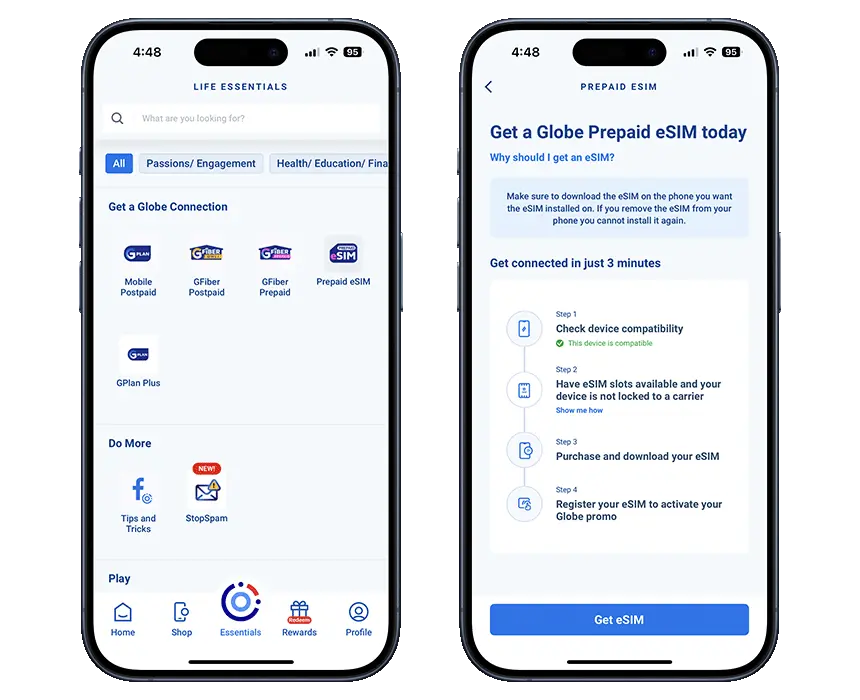
If you’re a Globe user in the Philippines, you must know that converting your physical SIM to eSIM can give you more convenience, flexibility, and a modern mobile experience without the need for a physical card. This upgrade is especially useful for users who want to manage multiple numbers, switch networks easily, or use the latest smartphones without relying on a physical SIM.
In this guide, you will learn how to easily convert your Globe traditional SIM to a digital eSIM, step by step.
What is an eSIM?
An eSIM, or embedded SIM, is a digital SIM that is similar to a traditional SIM but built directly into your smartphone or device. Unlike a physical SIM card, you don’t need to insert or remove anything; you can activate your mobile network simply by scanning a QR code or entering details provided by your telecom provider. This SIM is designed for users who manage multiple numbers and switch monthly to other networks.
Globe Telecom offers this service for compatible devices, making it easier for users to switch without needing a physical SIM card.
Benefits of Converting to Globe eSIM
Switching from a traditional SIM to eSIM comes with several advantages. Here are some major benefits.
These benefits make a digital SIM a smart choice for modern smartphone users
Requirements Before Converting to eSIM
Before converting or starting the conversation process, make sure you follow these requirements
📋 Checklist
- Your device must support eSIM. You have these models: iPhone XS or newer Android models
- Your Globe SIM must be active and registered
- You must have a valid ID for verification of the SIM
- Stable or strong internet connection for activation
If your device is not compatible with this, you won’t be able to use the eSIM service
How to Convert Globe Physical SIM to eSIM
To convert your traditional SIM to eSIM, follow these steps for a smooth experience without facing any complications
Visit a Globe Store
Go to the nearest Globe store or customer service center and request to convert your physical SIM to a digital eSIM
Submit Required Documents
Submit the required documents, such as a valid ID card or your active Globe SIM number that you’re currently using for verification
Request eSIM Conversion
Ask the staff to process your SIM conversion; they will deactivate your traditional physical SIM and prepare to activate your digital eSIM profile
Receive QR Code
After the SIM profile, you will receive a QR code from Globe. This QR code is essential for activating your eSIM
Scan QR Code
Open your phone settings, go to mobile networks settings, and scan the QR code provided
Activate eSIM
Follow the on-screen instructions to complete activation. Once done, your eSIM will be active and ready to use.
Important Tips for Smooth Conversion
To avoid any major issues during the conversion process, keep these tips in mind
💡 Pro Tips
- Back up your contacts or important data emails before conversion
- Ensure your phone is fully charged, and power off in half process to avoid major issues
- Keep the QR code safe for future use
- Contact Globe support if activation takes time or the attempt fails
By following these tips, you will get a faster and smoother experience without facing any issues
Common Issues and Solutions
Sometimes users face issues during the conversion process, and to solve these issues, understand them. Here are a few common problems
| Issue | Solution |
|---|---|
| The QR code is not working | Sometimes, times out and gets expired. In this situation, request a new QR code from Globe |
| No network after activation | Sometimes, the network signal gets cut from your device; just restart your device |
| Device not compatible | Check eSIM compatibility before applying |
| Activation failed | Check the internet connection or contact Globe customer support |
Most of the time, problems are easy to fix with simple troubleshooting.
Conclusion
Converting your Globe physical SIM into a digital eSIM is simple and easy, especially in 2026. It is a beneficial process and allows you to enjoy a more advanced and flexible mobile experience without the need for a physical SIM card. By following the steps mentioned above, you can easily switch to eSIM and enjoy its modern features. If you have a compatible device and an active Globe SIM, now is the perfect time to upgrade to digital and experience the future of connectivity.